
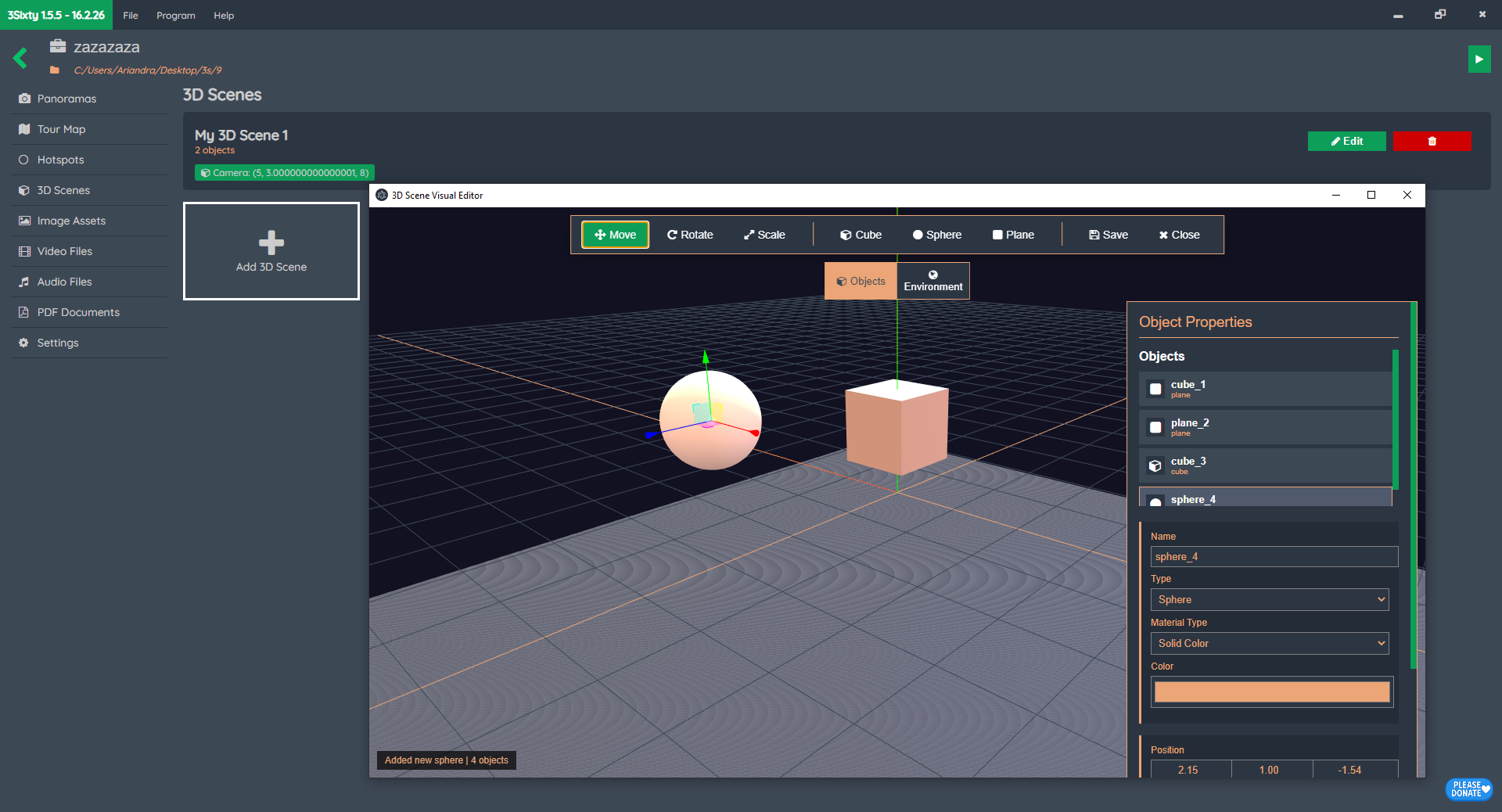
3D Scenes in your virtual tour? Why not

Wih, mantap nih update-nya! Fitur “3D Scene” pakai Three.js itu big deal banget buat platform virtual tour. Kodenya juga kelihatan sudah pakai Electron dan punya sistem properties panel yang rapi.

Berdasarkan draf kamu, ini ada 3 opsi copywriting dengan gaya bahasa yang beda-beda (Professional, Enthusiastic, dan ala Startup Silicon Valley) supaya audiens kamu makin tertarik buat nyobain fitur eksperimental ini.


Opsi 1: Professional & Polished (Cocok untuk LinkedIn/Website)

Headline: Introducing 3D Scene: Elevate Your Virtual Tours with Interactive Environments

Iโ€™m excited to announce the latest update for 3Sixty. This release introduces an experimental feature: 3D Scene.
With this new visual editor, you are no longer limited to flat panoramas. You can now:

  • Embed 3D Objects: Add cubes, spheres, and custom planes directly into your virtual space.

  • Visual Editor: Manipulate objects in real-time with intuitive Move, Rotate, and Scale tools.

  • Enhanced Interactivity: Create a more immersive experience by blending 3D elements with your 360ยฐ tours.

This feature is currently in experimental mode, and I canโ€™t wait to see the creative ways you use it to engage your audience. Update your 3Sixty now and start building!


Opsi 2: High-Energy & Enthusiastic (Cocok untuk Komunitas/Grup FB)

Headline: Level Up! ๐Ÿš€ 3Sixty Just Got a 3D Reality Boost!

Ever felt like your virtual tours needed that extra “pop”? 3Sixty just got a massive update that changes the game!

Iโ€™ve just pushed a recent update featuring the experimental “3D Scene” Visual Editor. Now you can actually build inside your tours! Want to add interactive 3D elements or create a more engaging environment? You got it.

Whatโ€™s new: โœ… 3D Object Support (Cubes, Spheres, Planes) โœ… Texture & Material Control (Add your own images to 3D shapes!) โœ… Interactive Gizmos for easy spatial editing. โœ… Custom Action Triggers for every object.

Go grab the update, play around with the 3D Scene, and let’s make virtual tours more immersive than ever!


Opsi 3: Short & Punchy (Cocok untuk Instagram/X/Changelog)

Headline: 3Sixty Update: The 3D Scene Era is Here! ๐ŸŒ

Virtual tours just evolved. The latest 3Sixty update introduces our experimental 3D Scene editor.

Transform static panoramas into dynamic, interactive spaces by adding and editing 3D objects on the fly. Whether you’re adding branding or interactive hotspots, the new visual editor makes it seamless.

๐Ÿš€ 3Sixty Virtual Tour Maker v1.5.0 is Here! ๐ŸŒ

Weโ€™re excited to announce the latest update to 3Sixty Virtual Tour Maker โ€“ version 1.5.0 โ€“ bringing faster performance, more flexibility, and an improved user experience!

โœจ Whatโ€™s New in v1.5.0:

  1. Powered by Three.js
    Say goodbye to Panolens! Our viewer now runs entirely on pure Three.js, giving you more control, better performance, and a smoother panorama experience.

  2. Streamlined Focus (No VR Mode)
    Weโ€™ve removed VR mode support to fully focus on delivering the best non-VR virtual tour experience possible.

  3. Custom Hotspot Images
    Upload any image directly and use it as a clickable hotspot. Personalize your tour like never before!

  4. Enhanced Tour Map ๐Ÿ—บ๏ธ
    The Tour Map feature has been redesigned to give a clearer, more intuitive overview of your entire virtual tour.

  5. Improved Panorama List ๐Ÿ“ธ
    Navigating between panoramas is now smoother, more responsive, and visually refined.

How to show panorama list menu and how to remove ads using the Remove Ads Plugin

Latest 3Sixty version right now is 1.2.2 and the latest update includes a feature that enable you to show the list of panorama scenes in your Virtual Tour as a floating menu in left side of your tour.

In this video I will show you how to enable the panorama list menu:

To support the developer, you can purchase the Remove Ads plugin. Here I will show you how to install that plugin to 3Sixty:

You can reposition your existing hotspots in 3Sixty 1.2.0

Unlike previous versions, now you can reposition your existing hotspots. There is an Edit Position button in each hotspot item in your panorama list. To reposition your hotspot, click that button, then wait for panorama viewer window to appear. Then press control button your keyboard and click any new area in your panorama to submit the new position. That easy!

One common problem with 3Sixty Web Tour Maker and how to fix it temporarily

One of the common problems with this software that causes some panorama could not be loaded is file and directory name, that if you have empty space (white space), dash or underscore characters you will face this problem.

I think the solution is to temporarily rename your panorama files to not having those problematic characters until new update of this program is released.

How to add your custom hotspot icon for your panorama virtual tour in 3Sixty Web Tour Maker

NOTE: Currently since 3Sixty version 1.1.1 you can easily use any image file as hotspot icon. Check out this blog post: https://3sixty.webappdev.my.id/2022/04/now-you-can-easily-use-any-image-file-as-custom-hotspot-icon-in-3sixty-web-tour-maker/

All the hotspot icons in 3Sixty are base 64 encoded images and they are stored in a file named imagedata.js. You can create your own hotspot icon by converting any image, for example a transparent png image to base 64 encoded image by using this cool website https://www.base64-image.de/ then copy the code and paste it inside imagedata.js file.

In this video I will let you know how to add a custom icon to your 3Sixty Web Tour Maker software to be used as a hotspot icon in your virtual tour.

https://www.youtube.com/embed/USZRpReEQkU
Visitor Counters free